
The moment every NECO candidate has been waiting for is finally here. The National Examinations Council (NECO) has officially released the 2026 Senior School Certificate Examination (SSCE) Internal results, and thousands of candidates across Nigeria are now eager to check their scores.
If you sat for this year’s examination, you are probably wondering how to access your results without any hassle. The good news is that the NECO result checker portal is now live and ready for you to use.
This easy guide walks you through the entire process, step by step. Whether you are checking from your phone, a cybercafé, or a laptop, you will find everything you need right here.
NECO 2026 SSCE Results: Key Statistics at a Glance
Before we get into the checking process, here is a quick overview of how candidates performed in the 2026 examination:
| Performance Metric | Statistics |
|---|---|
| Total Candidates Registered | 1,378,048 |
| Total Candidates Who Sat | 1,371,992 |
| Five Credits & Above (Including English & Maths) | 804,948 (58.67%) |
| Five Credits & Above (Irrespective of English & Maths) | 1,162,118 (84.70%) |
| Malpractice Cases | 1,406 candidates (64.74% drop) |
The results were released just 63 days after the last paper was written, which is a remarkable improvement in turnaround time. For university admission hopefuls, the 58.67% who obtained credits in both English Language and Mathematics represent the group that meets the standard benchmark.
What You Need Before Using the NECO Result Checker
To successfully check your 2026 NECO result, you need to have the following items ready. The NECO result checker will not work without them.
Your NECO Registration Number: This is your unique examination identifier. It is different from your JAMB registration number. You can find it on your examination slip.
A Valid Result-Checking Token: This is the digital key that unlocks your result. Candidates without a token can purchase one directly through the official NECO portal.
A Phone, Tablet, or Computer with Internet Access: The portal is mobile-friendly, so you can check your result from anywhere.
Ensure you have these three items before you begin. It will save you a lot of frustration.
Step-by-Step Guide: How to Check Your NECO 2026 Result Online
Follow these simple steps to access your result using the NECO result checker.
Step 1: Visit the Official NECO Result Portal
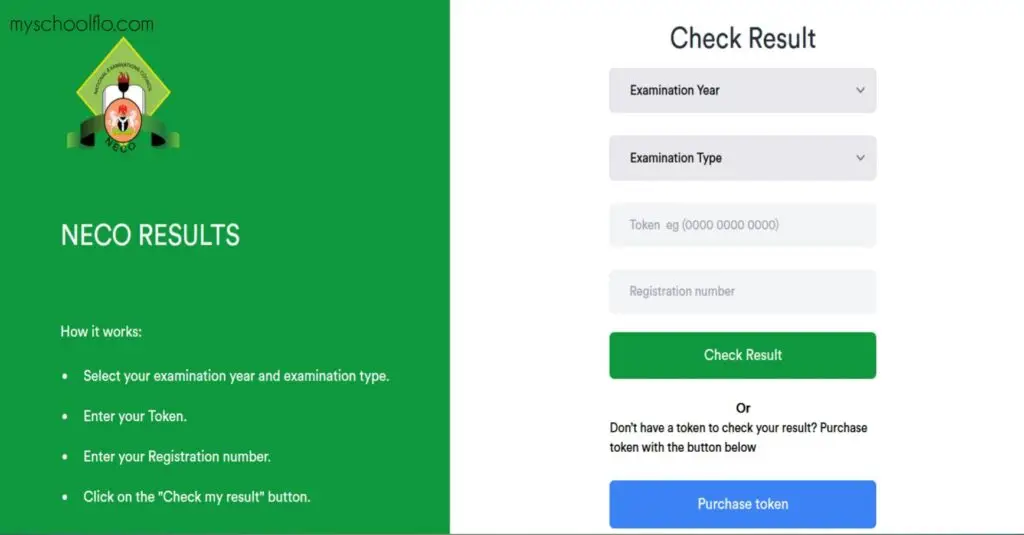
Open your internet browser and go to the official NECO result-checking portal at results.neco.gov.ng.
Important: Only use this official portal. Avoid any other website claiming to offer NECO result checking services. They are likely scams.
Step 2: Select Examination Year and Type
Once the portal loads, you will see fields to customize your search.
Examination Year: Select 2026 from the dropdown menu.
Examination Type: Choose SSCE INTERNAL (JUN/JUL) if you are a school-based candidate. Private candidates should select the corresponding SSCE EXTERNAL option.
Double-check these selections. Selecting the wrong year or type will prevent your result from loading.
Step 3: Enter Your Result-Checking Token
In the space provided, type your NECO Result Checking Token.
If you do not have a token yet, look for the “Purchase Token” option on the portal. You can create an account or log in to buy one directly. The price will be displayed on the official portal—rely on that figure rather than information from social media.
Step 4: Enter Your Registration Number
Carefully enter your NECO Registration Number in the appropriate field.
This is where many candidates make mistakes. Double-check every digit. A single wrong number will return an error message.
Step 5: Click “Check Result”
Once all information is entered correctly, click the “Check Result” or “Check My Result” button.
If everything is correct, your 2026 NECO SSCE result will appear on the screen.
Step 6: Save or Print Your Result
Your result will display with your subject grades. Take a screenshot immediately. Better still, use your browser’s print function (Ctrl+P or Cmd+P) to save it as a PDF.
Important: The portal may time out, so do not delay saving your result once it appears.
Troubleshooting: What to Do If Your NECO Result Does Not Load
It is common for the NECO result checker portal to experience heavy traffic immediately after results are released. If you encounter difficulties, here is what to do:
Check Your Details: Confirm you selected 2026 as the exam year and the correct exam type (SSCE Internal).
Verify Your Token and Registration Number: Re-enter them carefully. Errors are the most common cause of failed checks.
Check Your Internet Connection: A stable connection is required. Switch to a different network if possible.
Try Again Later: If the portal is overloaded, wait a few hours and try again. Early morning or late night are usually better times.
If problems persist, visit a trusted cybercafé or contact NECO support through official channels.
Important Things to Know About the NECO Result Checker
Token Usage: NECO has reportedly changed its token policy. Previously, a token could be used up to five times. Current information suggests a single token may now only allow one check. This means you should be absolutely sure your details are correct before clicking “Check Result.” Download and save your result immediately after viewing it.
Official vs. Unofficial Platforms: Only use results.neco.gov.ng. Do not share your examination details with unverified individuals or websites. NECO has warned candidates against fraudulent platforms promising fake result upgrades.
Online Result vs. Official Certificate: The printout from the NECO result checker portal is a digital result slip. For university admissions and employment verification, you may need an official NECO Statement of Results, which requires a separate application and fee.
Is the NECO 2026 result really out?
Yes. The National Examinations Council officially released the 2026 SSCE Internal results on Thursday, September 23, 2026. The announcement was made by the Registrar, Prof. Dantani Wushishi, at NECO headquarters in Minna, Niger State.
How much does a NECO result-checking token cost in 2026?
The token price is typically around ₦750. However, prices can change, and payment options may vary. Always confirm the current price displayed on the official NECO portal before purchasing.
Can I check my NECO result without a token?
You cannot view your full result without a token. NECO sometimes provides a limited free summary check showing a basic pass/fail status, but to see your NECO result with subject-by-subject grades—which universities require—you must purchase a result-checking token.
How many times can I use my NECO result-checking token?
This is critical. NECO has reportedly reduced token usage from five checks to one check. This means you should enter your details carefully and save your result immediately after your first successful check. If you need to check again, you may have to purchase a new token.
What is the difference between the 58.67% and 84.70% pass rates?
The 58.67% figure refers to candidates who obtained five credits including English Language and Mathematics. The 84.70% figure refers to candidates who obtained five credits irrespective of their grades in English and Maths. For university admission, the 58.67% benchmark is the relevant figure.
Can I check my NECO result on my phone?
Absolutely. The NECO result checker portal is mobile-friendly. You can check your result using any smartphone, tablet, or computer with internet access. Just follow the same steps outlined in this guide.
Final Advice for Candidates
Now that your NECO result is available, the next steps matter. If you met the credit requirements for your desired course, congratulations. You can proceed with your JAMB and Post-UTME registration with confidence.
If your results did not meet your expectations, do not be discouraged. NECO offers opportunities to resit examinations. Take the time to prepare and try again.
Give us a feedback through our Contact form
Whatever your outcome, remember that this is just one step in your academic journey.
Good luck!